01
Every account at a glance
Each account's 7-day window, its reset time, and which account serves next.
Docs: Every account at a glanceThen let Claude, GPT and Grok work in the same Claude Code session.
Islands app + CLI
brew install --cask 2lab-ai/tap/llmux-islandsCLI only
brew install 2lab-ai/tap/llmuxRolling preview
brew install 2lab-ai/tap/llmux-previewStable is 0.2.27 (2026-11-21). Stable and preview both install the llmux command; the one brew links is your channel.
From install to Codex, Antigravity, Islands and the web dashboard · 4:27
Plays from this site. Captions in English and Korean are in the player's menu.
macOS, with Homebrew
01
Install the llmux Islands app with the CLI, or the CLI on its own. For the preview channel, see Install and channels.
Islands app + CLI
brew install --cask 2lab-ai/tap/llmux-islandsCLI only
brew install 2lab-ai/tap/llmux02
Run llmux login once for each Claude account. For the others, add a flag. Or, in Islands, choose Connect your first account (every provider except OpenRouter).
Claude, once per account
llmux loginCodex (ChatGPT)
llmux login --codexGrok (xAI)
llmux login --grokOpenRouter
llmux login --openrouterGemini: read the note at the end first
llmux login --gemini03
llmux run starts the llmux daemon, or reuses a running one, then opens Claude Code pointed at it. Arguments after -- go to Claude Code.
Claude Code
llmux run04
llmux dashboard attaches to the running daemon and shows your accounts, the scheduler, the models and every request. Or open llmux Islands from the menu bar.
In a second terminal
llmux dashboard14 short videos, one feature each
01
Each account's 7-day window, its reset time, and which account serves next.
Docs: Every account at a glance02
Sessions in flight on the closed island; open it for every account's window and the statistics.
Docs: llmux Islands, the menu-bar app03
Sessions, their requests and every leg of each request, plus activity and accounts, in a browser.
Docs: The web dashboard04
/model switches the backend; the model name is the route.
05
Agent files with a GPT or Grok model run as ordinary Claude Code subagents.
Docs: Claude writes, GPT and Grok review06
llmux run --codex launches Codex against the same pool.
07
llmux run --agy starts agy in its gateway mode against llmux.
08
Tokens and API-equivalent cost by hour, day or month, per model.
Docs: Usage and cost09
Time to first byte and tokens per second for every provider and model.
Docs: Observed performance10
Every leg of an exchange, with copy as curl.
Docs: See what reached the model11
Each setting says whether it applies live or after a restart.
Docs: A config editor in the dashboard12
Per-computer keys, usage counted per computer.
Docs: One daemon, several computers13
llmux usage, llmux env, the /models API, and the stats and sessions tabs.
14
llmux channel switches between stable and preview; llmux update upgrades in place.
A native macOS menu-bar and notch companion, with a KDE/Qt port. It shows every connected account, how much of its 7-day window is left, and when it resets.
Islands app + CLI
brew install --cask 2lab-ai/tap/llmux-islands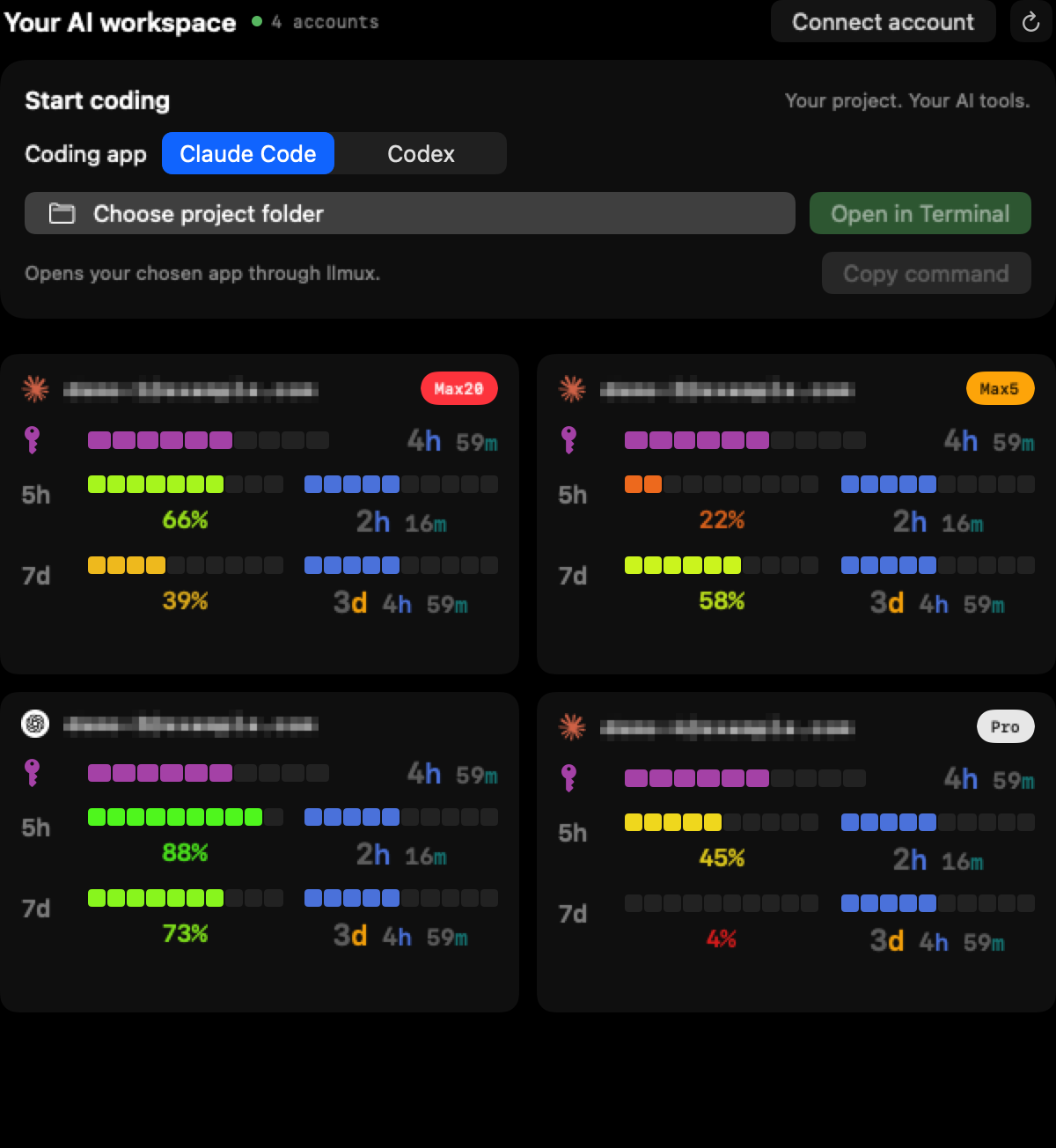
Stable 0.2.27 · preview is rolling
| You want | Command | Channel |
|---|---|---|
| Islands app + CLI | brew install --cask 2lab-ai/tap/llmux-islands | stable (0.2.27, 2026-11-21) |
| CLI only | brew install 2lab-ai/tap/llmux | stable (0.2.27, 2026-11-21) |
| Rolling preview, CLI | brew install 2lab-ai/tap/llmux-preview | preview |
| Rolling preview, app + CLI | brew install --cask 2lab-ai/tap/llmux-islands-preview | preview |
| Build from source | git clone https://github.com/2lab-ai/llmux && cd llmux && just build | your checkout |
Each Islands cask depends on its channel's formula, and the two casks conflict.
llmux channelllmux updatellmux channel previewllmux channel stable switches back. The Islands cask follows.llmux login --gemini.